

sunsunmoon
Member
- Joined
- Nov 29, 2010
- Member Type
- Student or Learner
- Native Language
- Spanish
- Home Country
- Argentina
- Current Location
- Japan
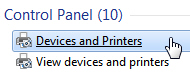
1. Open Devices and Printers in Control Panel.
(From http://www.brighthub.com/computing/windows-platform/articles/92452.aspx#imgn_0)
1. Click the Windows "Start" button and then "Control Panel." Click "Devices and Printers" under "Control Panel."
(From http://www.ehow.com/how_7702371_delete-hp-printer-drivers.html)
- "Devices and Printers" in "Control Panel"(From http://www.brighthub.com/computing/windows-platform/articles/92452.aspx#imgn_0)
1. Click the Windows "Start" button and then "Control Panel." Click "Devices and Printers" under "Control Panel."
(From http://www.ehow.com/how_7702371_delete-hp-printer-drivers.html)
- "Devices and Printers" under "Control Panel"
Are these interchangeable?


